A writing repository
Posted on: January 18, 2020
Random Thoughts provides access to previously published articles in professional journals for school media specialists and educators interested in using primary sources in their classroom. Select the tabs above to view articles.
Posts also offer tidbits and ideas for finding and using digital primary sources.
DOWN THE RABBIT HOLE WITH A TEDDY BEAR
It wasn’t quite a rabbit hole, but you just never know where a single comment will lead you. It all began with a post about Mother’s Day resources in America’s Story From America’s Library, a Library of Congress (LC) site for younger learners. The treasures shared inspired me to offer primary sources and stories about Teddy Roosevelt, which are useful in conjunction with The Legend of the Teddy Bear, a picture book. Others quickly shared more resources and teaching ideas. I can almost hear the teddy bear songs. Swapping stories about using primary sources and sharing stories told through primary sources is what the TPS Teachers Network is all about.
The network is a professional social media platform . . . . Read More
There is nothing quite like seeing what we’ve read about in person!
A few days ago I visited the Old Slave Mart Museum in Charleston where the auction for 55 Prime Negroes, accustomed to the culture of Rice was held at 11:00 am January 21, 1857, by Louis D. DeSaussure – There it was, a reproduction of a familiar document I use in various teaching activities.
It is believed that 35 – 40% of the slaves in the United States entered through the port of Charleston. Many were sold at Ryan’s mart, owned by Thomas Ryan, a Charlotte alderman and former sheriff. Ryan’s mart is the only known existent building used as a slave auction gallery in South Carolina and on the National Register of Historic Sites.
Most of the story about the journey to America and the auction process is told through visuals, but some artifacts exist. These include a whip, chains, balls, and the chilling auction block.
The flyer is ideal for observation, questioning, and encouraging engaged discussion.
- Understanding flyer vocabulary
- Descriptions of the slaves and what they mean
- The condition of the document and written notations
- Issues surrounding using the document in the classroom
Related Resources
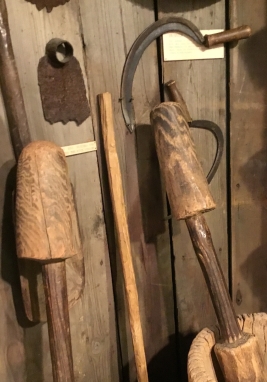
Rice field tools displayed at the Rice Museum, Georgetown, Georgia.
- Born in Slavery: Slave Narratives from the Federal Writers’ Project, 1936 to 1938 is one complementary resource. Take a look at vol 14, South Carolina, and don’t miss the about this collection
- Find related materials searching photos, prints and drawings, narrow down by location Example: New method of assorting the mail, as practiced by Southern slaveholders, or attack on the Post Office, Charleston, S.C. (Burning abolitionist mails)
- Audio recordings of slave interviews
The Rice field flyers are available through Duke University Libraries Emergence of Advertising in America, 1850 – 1920. Search for auction flyers such as List of 17 Rice Field Negroes for Sale and 55 Prime Negroes
Content is part of a longer post published on the Teaching With Primary Sources Network, Feb. 2018
Stars over Clear Lake
Posted on: December 21, 2017
Last December I wrote about the Camp Algona Nativity Scene created by German Prisoners of War. Earlier, I wrote about a visit to the historic Surf Ballroom in nearby Clear lake, another small north Central Iowa city. Stars over Clear Lake, historical fiction by Loretta Ellsworth weaves together Camp Algona and the Surf in a story of remembrance and discovery. Shifting between 2007 and the 1940s, Lorraine returns to Clear lake for the first time in many years. She revisits places and people of her past, remembering Jens and other prisoners of war from nearby Camp Algona who worked on the family farm during World War II. Other friendships and family struggles contribute to the story with a surprise ending.
It’s a compelling summer or holiday read – and an interesting way to learn about German Prisoner of War Camps and historic ballrooms, two aspects of American history and culture that are not widely known. The novel is for older high school students and offers many interesting curriculum possibilities.
- An enduring symbol of peace: How World War II POWs built a nativity scene and goodwill. Iowa History Journal, Nov/Dec 2017.
- Primary Source Spotlight: Enemy Aliens & Internment During the World Wars. (TPS-Barat)
- The Camp Algona Nativity City (December 2016 post)
- Frank, Marian and Peggy Sue (2011 post)
- Camp Algona Museum
- Whitewater’s German POW Camp; Learning more about POWs in the U.S. (with resource list)
Learn how to find and use primary sources in your classroom!
Ellsworth, Loretta. Stars over Clear Lake, St. Martin’s Press 2017.
The DP.LA, The Digital Public Library of America has published 20 new Primary Source topics on diverse topics for U.S. and World history, science and technology, literature and arts. Primary sources sets, including those curated by the Library of Congress, are collections of multiple individual primary source artifacts surrounding a specific theme They are free, quality “go-to” tools for teachers needing resources and for media specialists collaborating with or identifying appropriate resources for teachers.
New DP.LA sets include the expected (The Battle of Gettysburg) and possibly unexpected but wished for (Columbian Exposition), boosting the total of sets available to well over 100! This is great and welcome news! The growing and complementary collections of sets from DP.LA and the Library of Congress
Continue reading Revisiting Expanding Collections of Primary Source Sets, Internet@Schools, Sept/Oct 2017.
Primary Source Sets Comparison, DP.LA., Library of Congress (Including ebook Student Discovery Sets)
The onset of technology in education coincided with my experience planning a small, but attached lab as part of a new media center in the 1980’s. In a short while I was reorganizing and repurposing a very old media center to accommodate computer labs. In the early 2000’s my former school districts planned new media centers with multiple computer labs and workstations. The labs were heavily used; spaces were sometimes booked weeks in advance. That was then; this is now. The rapid implementation of 1:1 computers makes it apparent that a model that worked for 20-25 years is no longer needed. What is happening to all of those labs and computer areas within media centers? How labs being redesigned and spaces repurposed? What design mistakes did we make in 15-20 years ago? What still works?
I posed my question to discussion groups and received numerous thoughtful and interesting responses. There is exciting change in place as media specialists continue to respond to and become part of change. Their responses also suggest much of the old is still good while long-standing and traditional design musts are still there as are long-standing design woes. Other features became quickly obsolete. An article addressing my questions and was published in Internet@Schools, March/April 2017. Complete article: Integrating Technology Then … And Now: From Computer Lab to Design Flexibility
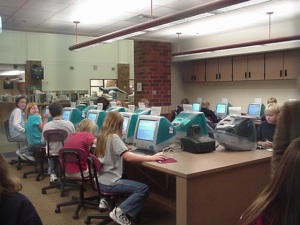
First used in 2000, this lab open, u-shaped lab worked well for teaching and collaborative learning. It was easily supervised and has helpful storage. It could become a Makerspace in 2017.
The Camp Algona Nativity Scene
Posted on: December 16, 2016
 This December, as they have since the end of World War II, residents and visitors to Algona, Iowa, will gather to view a Nativity Scene created by German architect Eduard Kaib while he was a German Prisoner of War at Camp Algona.
Kaib, an architect by trade, created a small nativity scene that impressed the Camp Commander who asked him to create a larger version. Kaib enlisted five friends to help create 60 half-size figures from wood, wire and plaster. Prisoners paid for the construction. When World War II ended the camp was disbanded and the scene was left to the city of Algona. It was first available for public viewing Christmas 1945. Since the 1950s the scene has been housed in a special building. The nativity scene is maintained by the Algona United Methodist Church and available for viewing each holiday season. Visitors have included former POWs and family members.
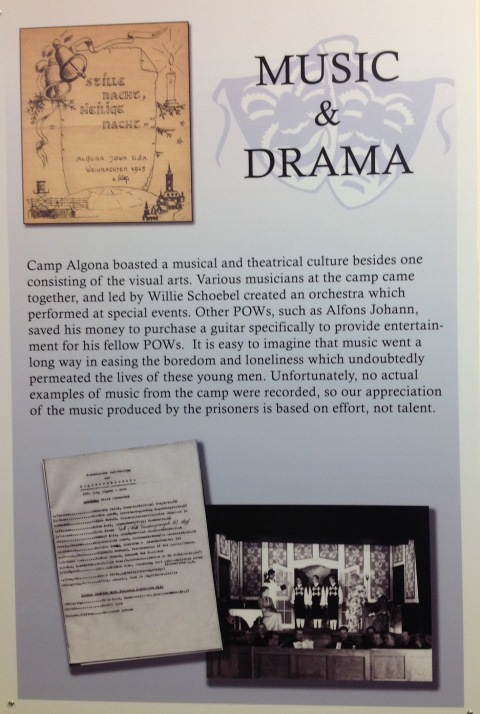
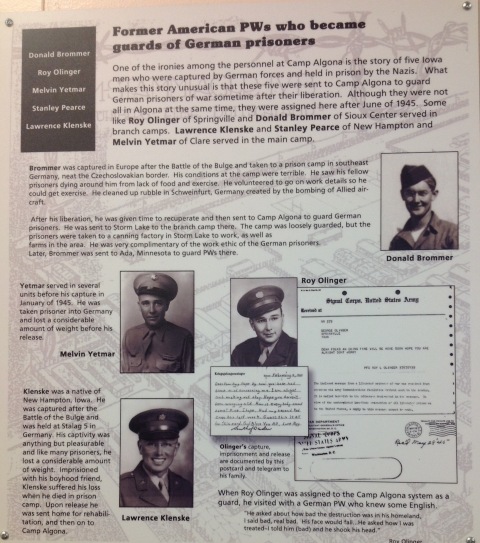
German POWs were able to pursue other artistic endeavors while living at Camp Algona. There was a camp orchestra, band, and German language newspaper and art classes. A small crèche, carvings, woodwork and paintings are displayed at the Camp Algona Museum. Exhibits depict POW camp experiences, POW contributions to the farm economy, and their interactions with community members who feared the POWS until they realized “they look just like us.” Exhibits also highlight camp military and civilian workers, contributions of Kossuth County women to the war effort, and Americans held in Axis POW camps. Four military guards stationed at Camp Algona were former prisoners in these camps. Prisoners received medical treatment and only a very few died while at the camp; a Lutheran pastor provided Sunday worship services in English and German.
Camp Algona was the base camp for over 10,000 German Prisoners of War from 1943-1946. Branch camps were in Iowa and neighboring states. One branch camp, the Whitewater POW Camp, was at a former Civilian Conservation Corps camp in Winona County (Southeast Minnesota.) Camp Algona’s buildings were torn down and the wood was reused after the war ended. The camp site is now the location of a National Guard Armory and a city airport.
After visiting the museum we spoke with a local citizen who grew up a farm near the camp. She got to know prisoners who worked on the family farm or attended church with her family. These friendships were not uncommon and many former POWS visited Algona after the War. Visiting the Camp Algona Museum was on my “do” list for far too long; it was well worth the wait and visit. Two photos of museum displays and and resources are below.
The Camp Algona Nativity Scene (PDF)
POW Nativity Scene, narrated video with script, First United Methodist Church
Camp Algona Museum (website with links to the Nativity Scene)
Whitewater’s German POW Camp; Learning more about POWs in the U.S. (with resource list)
Learn how to find and use primary sources in your classroom!
I love historical art
Posted on: November 29, 2016
Once or twice a month I work as a gallery greeter at the Minnesota Marine Art Museum. First time visitors invariably make a bee-line to George Washington Crossing the Delaware by Emmanuel Leutze,, one of the two surviving versions of the iconic painting. Last week a group of college students were absolutely giddy about being able to view. They looked, talked, asked questions and came back for a second look after touring the rest of the gallery. I love historical art and seeing conversations like those take place. What other paintings can
Are paintings primary sources? Can one painting stimulate inquiry and exploration? Can it be the centerpiece of a lesson or interdisciplinary learning? How can maps be paired with paintings? In the November/December New Media Center column I shared some ideas that illustrate the power of a painting, used alone or paired with another resource to provide a great learning activity. For the Love of Historical Art!
The new Mississippi River bridge connecting Winona, Minnesota to Wisconsin (NORTH) was dedicated yesterday (August 26). It was a wonderful and fun event attended by many including the usual mix of local and state dignitaries. I especially enjoyed seeing what will be in a Winona time capsule that will be placed inside the new bridge. A few of the items people may be able to view in the future include
- Artifacts representing the Winona’s higher education institutions: Winona State University, St. Mary’s University of Minnesota and Minnesota State College-Southeast Technical
- Products from local manufacturers such as St. Croix knits sweater, a Winona State University pennant from Wincraft, and a Peerless Chain link
- Hot Companies, Cool Jobs, a Chamber of Commerce publication
- A high school yearbook and a working laptop with the School District’s Winhawk mascot as a screen saver (Will the computer still be functional when the time capsule is opened many years into the century?)
- A Jim Heinlen print of Winona’s architectural highlights
- Commemorative magnets t-shirts and caps
- A Great River Shakespeare festival poster depicting the Mississippi River and bluffs; it is also by autographed by company members
- Tributes to notable Winona State theater professor Vivian Fusillo
- Copies of current local newspapers (Winona Daily News and the Winona Post) including special publications about the old and new interstate bridges
- . . . and an autograph book to preserve the names of people who attended the dedication
- . . . and much more
It’s a great and appropriate collection representing Winona 2016!
What would you include in a time capsule representing you community?
An abundance of photos! (Winona Daily News, August 28, 2016)
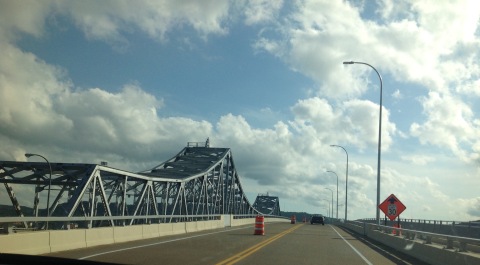
A first drive across the new bridge from the North and Wisconsin. The iconic and historic old bridge will be the bridge to Wisconsin when all construction is complete.
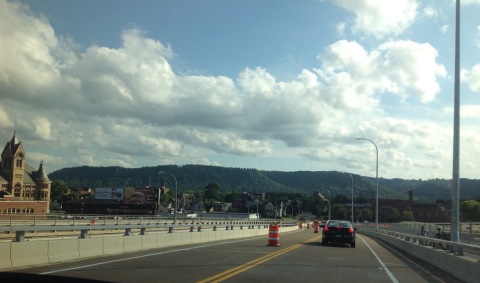
The same familiar city sites and bluffs to the South.
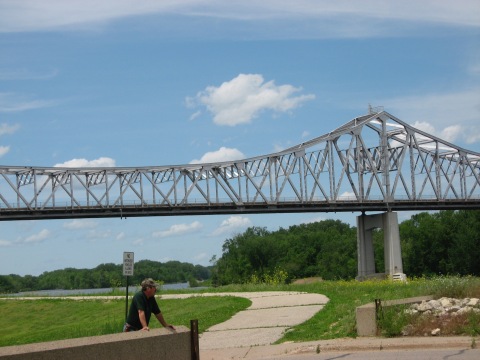
The “old” bridge was quiet for a week in 2008 when it was closed for repair
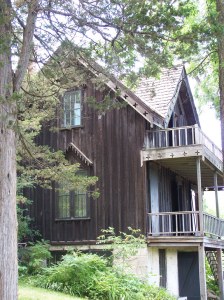 The Carpenter Gothic Revival style Bunnell House captures the interest of people driving buy along the Mississippi River near Homer on US. Highway 61. The home’s simple, but yet ornate and unpainted board structure was constructed in the 1850’s by Willard Bunnell, one of Winona County’s first settlers. Bunnell made his money through development and the timber industry. The distinctive home is on the National Register of Historic Places “for having state-level significance in the themes of architecture, commerce, and exploration/settlement. ” The home was Minnesota’s first permanent white home south of St. Paul and Bunnell’s second home, his first being a log cabin he built after receiving permission from Chief Wapasha III to build a log cabin on the west bank of the Mississippi.
Lafayette Bunnel, Willard’s younger brother, also made the journey westward to the Minnesota Territory from Homer, New York. Lafayette’s life was filled with a variety of unique adventures that took eventually him far from southeast Minnesota. He was a soldier and doctor in the War with Mexico and later in the Civil War where he served with Minnesota’s Company K. During the Gold Rush era he traveled to California and joined Mariposa Battalion, the first non-Indians to enter Yosemite Valley. Bunnell is credited for naming the Valley. He later returned to the home where he wrote his account of discovering Yosemite; he died at the Bunnell home in 1903. It was fun to find his account of the discovery in the Library of Congress Collections.
The home is now property of the Winona County Historical Society. Lafayette’s life, as told through his memories, is the subject of an enjoyable, sometimes humorous, and very informative short play presented this summer in the historic home’s living/ dining room. The play is produced by the Historical Society and Theatre Du Mississippi.
I had no idea that someone who lived within walking distance of my home had a role so significant in the establishment of our national parks! What’s in your back yard?
Primary and Secondary Sources
- Discovery of the Yosemite, and the Indian war of 1851, which led to that event. By Lafayette Houghton Bunnell
- Evolution of the Conservation Movement, 1850-1920 (A Library of Congress Collection)
- Bunnelll-Bonnell Family History
- Lafayette Bunnell
- Willard Bunnell House
- Wapasha Praire to Winona: Winona’s Early History
Learn more about using Primary Source sets in your classroom
Visiting the Angle
Posted on: May 8, 2016
A recent CBS morning news feature on Minnesota’s Northwest Angle caught my attention, reminding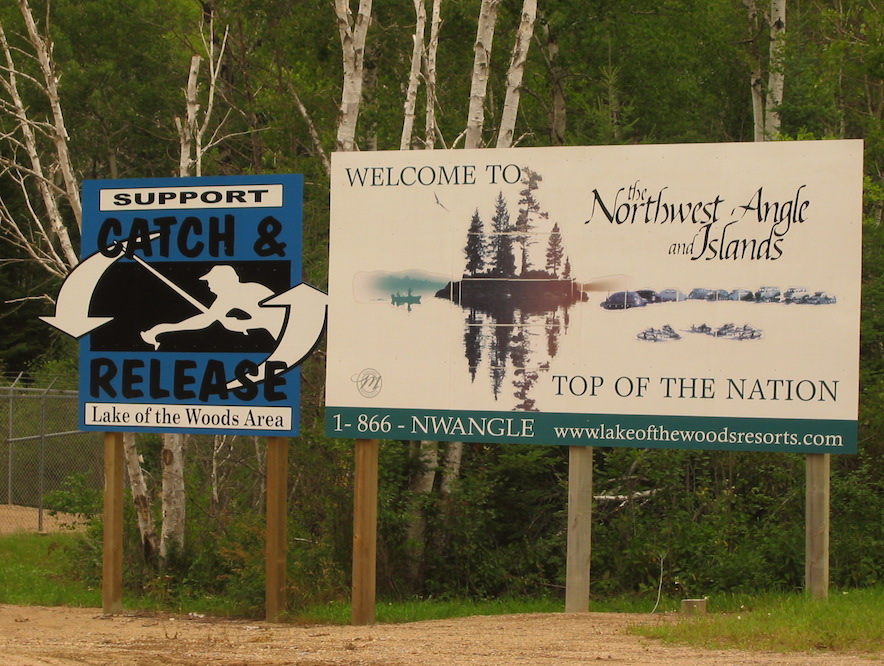 me of our interesting and unique visit to the most northern port of Minnesota a few years ago. The Northwest angle is that part of Minnesota but only shares a land border only with Canada. The rest of the Angle is part of large Lake of the Woods. We made it to the Angle directly from the west via Manitoba, traveling there by land requires leaving the United States, entering Canada, and then reentering Minnesota.
This unique geographic feature is the result of a mapping error by a mapmaker and erroneous ideas about the source of the Mississippi. Now part of the Library of Congress Map collections, the Mitchell map depicts land as known in 1757 and when the Treaty of Paris was signed after the Revolutionary War.
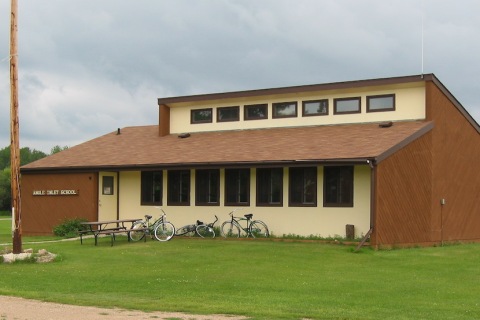
 Our favorite memory of visiting Angle Inlet is getting there by gravel road and stopping at Jim’s Corner, the customs checkpoint where we reported our arrival via videophone. The roadside stand reminded me of a telephone booth. Angle Inlet has a small post office, community store, and a modern one-room elementary school. Older students travel 60 miles to attend high school. Resorts offering lodging and recreation provide employment for the year-round residents and support the tourism industry.
Our visit to Angle Inlet was brief, but we learned a great deal about a local history, enjoyed a beautiful setting, and have great memories.
Resources
A map of the British and French dominions in North America, with the roads, distances, limits, and extent of the settlements, humbly inscribed to the Right Honourable the Earl of Halifax, and the other Right Honourable the Lords Commissioners for Trade & Plantations. Library of Congress Map Collections
Minnesota’s Northwest Angle, an American oddity, CBS News, May 1, 2016. <http://www.cbsnews.com/news/minnesotas-northwest-angle-an-american-geographic-oddity>
Angle Inlet School is a one-room throwback. Minneapolis Star Tribune, May 30, 2015.
When Books Went to War
Posted on: April 1, 2016
In the years leading up to World War II the German government destroyed millions of books considered undesirable to the Nazis way of thinking and how others should think or what they should learn. Throughout the book burning era,” 37 archives, 402 museums, 531 institutions and 957″ libraries were destroyed. Americans and institutions such as the American Library Association took action by organizing efforts to provide books for the growing number of Americans serving in the military who lacked the basics, including reading materials at military bases. Author Molly Manning provides an interesting (and sometimes humorous) account of what transpired in When Books Went to War: The Stories that Helped us Win World War II. (Houghton-Mifflin, 2014)
The initial goal of the Victory Book Campaign (VBC) was collecting 10,000,000 hardbound books through country-wide book drives. Hardbound books proved cumbersome and donated books were not always “suitable.” A newly formed group, the Council of Books in Wartime, led efforts to first purchase paperback books and the eventual publication of Armed Services Editions from 1942 – 1947. Millions of these small-sized editions representing popular and classic words of fiction and non-fiction were distributed to American military personnel throughout the world. Some titles such as The Great Gatsby and Tree Grows in Brooklyn remain at the literary forefront; others such as the popular Chicken on Sunday and Our Hearts were Young and Gay have faded from our reading tastes but provided enjoyable reading to thousands. The VBC and the ASE are credited with providing entertainment and comfort for members of the military. The projects also helped soldiers become readers and later college students under the GI Bill.
School library media specialists will relate to the familiar situations of attempted censorship of “hot” titles such as Forever Amber (always on a waiting list), limited funding, and unsuitable donations. The New York Telegraph explained, “too many people looked upon the voluntary campaign an opportunity to get rid of books that nobody would want.” There were also political issues. One senator thought the female ALA president was incapable of managing the VBC; another opposed the government’s involvement in publishing books with political overtones.
Manning’s book is an interesting and informative narrative. She become interested in the ASE and VBC when she discovered letters servicemen wrote to authors. Berlin’s Bebelplatz has a memorial to the 1933 book burning; there is not a memorial to the ASE and VBC in the United States. Manning hopes her book “may serve as a memorial to those efforts.” (Afterward)
This not too widely known aspect of life on the homefront during World War II is a unique topic for student research. Some suggested resources for student researchers are:
- Books in Action: The Armed Services Editions. Library of Congress Blog. Includes photos of the small-sized books.
- Books Join the Battle: The Victory Book Campaign. Life on the Homefront: Oregon Responds to World War II.
Photo: Victory Book Campaign. Soldiers of Fort Myer, Virginia, in Statuary Hall of the Capitol, receiving books donated by members of Congress for 1943 Victory Book Campaign

 Random Thoughts: Change, Primary Sources & Other Stuff

You must be logged in to post a comment.